 Passer au contenu
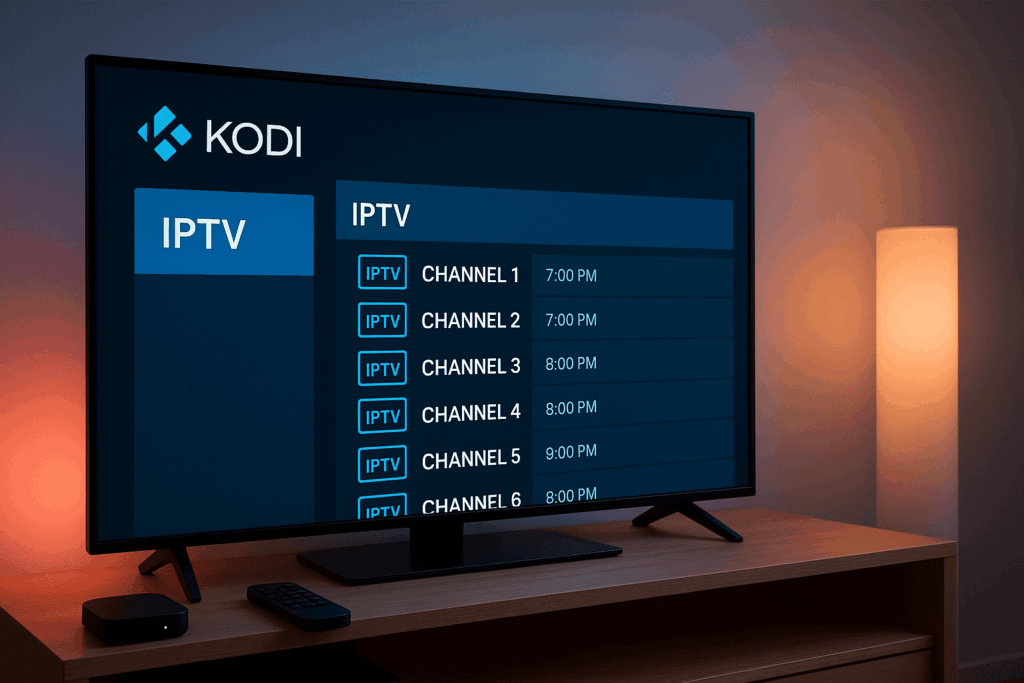
Introduction: What Is Kodi IPTV?
If you’ve been exploring ways to watch live TV, movies, and sports online, you’ve probably come across the term Kodi IPTV. But what exactly does it mean? To break it down:
Kodi is a free, open-source media center application that allows you to organize, stream, and play digital media files from your local storage or the internet.
IPTV stands for Internet Protocol Television, which is a modern way of streaming TV channels and on-demand content via the internet instead of traditional cable or satellite.
When combined, Kodi IPTV turns Kodi into a powerful IPTV player that can stream hundreds of live channels, catch-up TV, and even video-on-demand — all in one place. By adding the right IPTV add-on or configuring it with your IPTV subscription (such as Flixivo), Kodi can become your go-to platform for all entertainment needs.
One of the main attractions of Kodi IPTV is flexibility. You can run it on multiple devices — from Android boxes and Amazon Firestick to Windows PCs, Smart TVs, and even Raspberry Pi. Plus, the huge library of add-ons means you can customize your viewing experience to suit your preferences, whether that’s live sports, international TV, or niche content.
In short, Kodi IPTV is a combination of a feature-rich media player and a modern TV delivery system, giving you a cost-effective, highly customizable, and convenient way to watch what you love, whenever you want.
Why Use Kodi for IPTV?
There are plenty of IPTV apps out there, but Kodi IPTV stands out for its flexibility, device compatibility, and customisation options. Whether you’re a casual viewer or a streaming enthusiast, Kodi offers several unique advantages.
1. Free and Open-Source
Kodi itself is completely free to download and use. Being open-source means developers worldwide contribute to improving the platform, creating a huge ecosystem of add-ons, skins, and tools. You’re not tied to a single provider or locked into a subscription just to use the player.
2. Works on Almost Any Device
From Android TV boxes and Windows laptops to Firestick, Smart TVs, and even Raspberry Pi, Kodi IPTV runs smoothly on a wide variety of hardware. This makes it ideal if you want the same viewing experience on different devices around your home.
3. Endless Customisation
Unlike most IPTV apps that have a fixed interface, Kodi lets you change themes, reorganise menus, and add only the features you want. You can combine IPTV with local media, YouTube, radio streams, or even cloud storage.
4. Large Add-on Library
The real magic of Kodi IPTV is in its add-ons. With tools like PVR IPTV Simple Client or Playlist Loader, you can integrate your IPTV subscription into Kodi’s interface and browse channels just like on a regular TV — but with better features.
5. Centralised Entertainment Hub
With Kodi, IPTV is just one part of the picture. You can also manage your movie library, stream music, view photos, and even play retro games — all in the same interface.
6. Cost-Effective Streaming
Pairing Kodi with a reliable IPTV service like Flixivo can give you access to premium channels and on-demand content at a fraction of the cost of traditional cable or satellite.

Is Kodi IPTV Legal?
The short answer is: Kodi IPTV can be legal — but it depends on how you use it.
Kodi by Itself Is 100% Legal
Kodi is an open-source media center software developed by the non-profit XBMC Foundation. The software itself does not contain any illegal content. You can install it on your devices without breaking any laws — it’s no different from downloading VLC or another media player.
Where It Gets Complicated — The IPTV Side
IPTV (Internet Protocol Television) is simply a method of delivering TV over the internet. Just like Kodi, IPTV itself is a legal technology. Many well-known broadcasters, sports organizations, and streaming services use IPTV to deliver their content to viewers.
The problem arises when unlicensed IPTV streams are used. Some free or unofficial add-ons for Kodi provide access to copyrighted channels, movies, or sports without proper permission from the rights holders. In many countries, accessing or distributing such streams is illegal.
How to Use Kodi IPTV Safely and Legally
Choose a legitimate IPTV provider – Services like Flixivo offer licensed streams, meaning you can enjoy content without worrying about breaking the law.
Avoid shady “free IPTV” lists – Many of these are unreliable, illegal, or contain malware.
Use official Kodi add-ons – For example, the PVR IPTV Simple Client add-on in Kodi’s official repository is perfectly legal to use; legality depends on the IPTV playlist you add to it.
Consider using a VPN – Even with legal IPTV, a VPN can help protect your privacy and prevent ISP throttling while streaming.
Bottom line: Kodi IPTV is legal when paired with licensed, legitimate content sources. Stick to trusted IPTV providers and official add-ons, and you can enjoy all the benefits of Kodi IPTV without legal concerns.
How to Set Up IPTV on Kodi (Step-by-Step Guide)
One of the best things about Kodi IPTV is how easily you can turn Kodi into a fully functional IPTV player. The process is simple, and you don’t need any advanced technical skills — just follow these steps.
Step 1: Install Kodi
Download Kodi from the official website: https://kodi.tv/download.
Choose the correct version for your device (Windows, macOS, Android, Firestick, etc.).
Install it like any other app and launch it.

Step 2: Access the Add-ons Menu
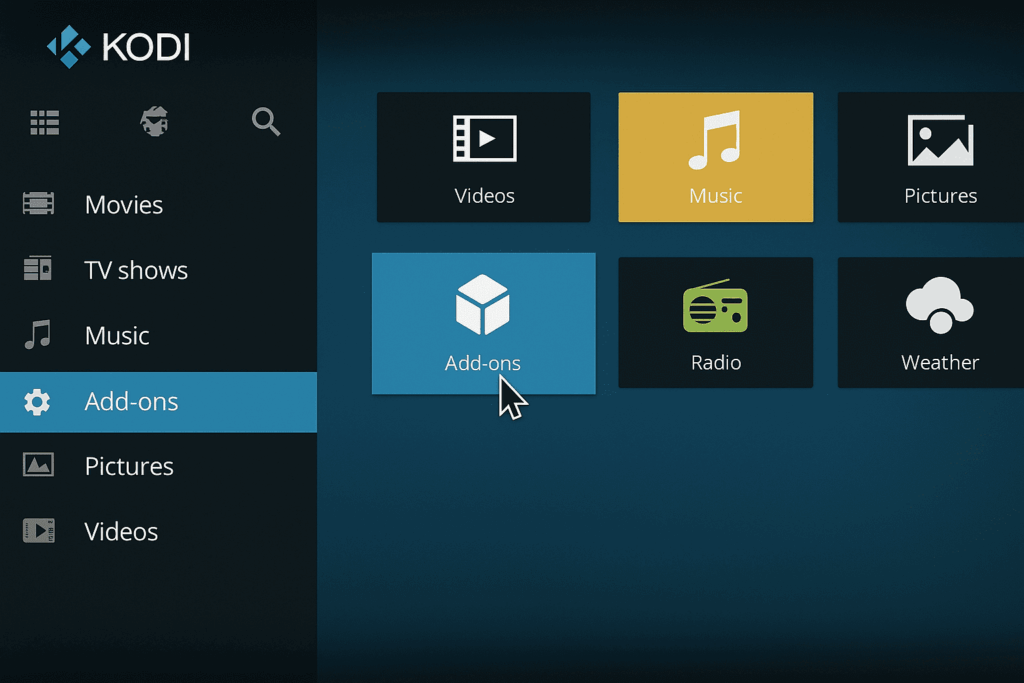
From Kodi’s home screen, scroll down and click on Add-ons in the left-hand menu.
Select the open box icon at the top left — this is the Add-on Browser.
Step 3: Install the PVR IPTV Simple Client
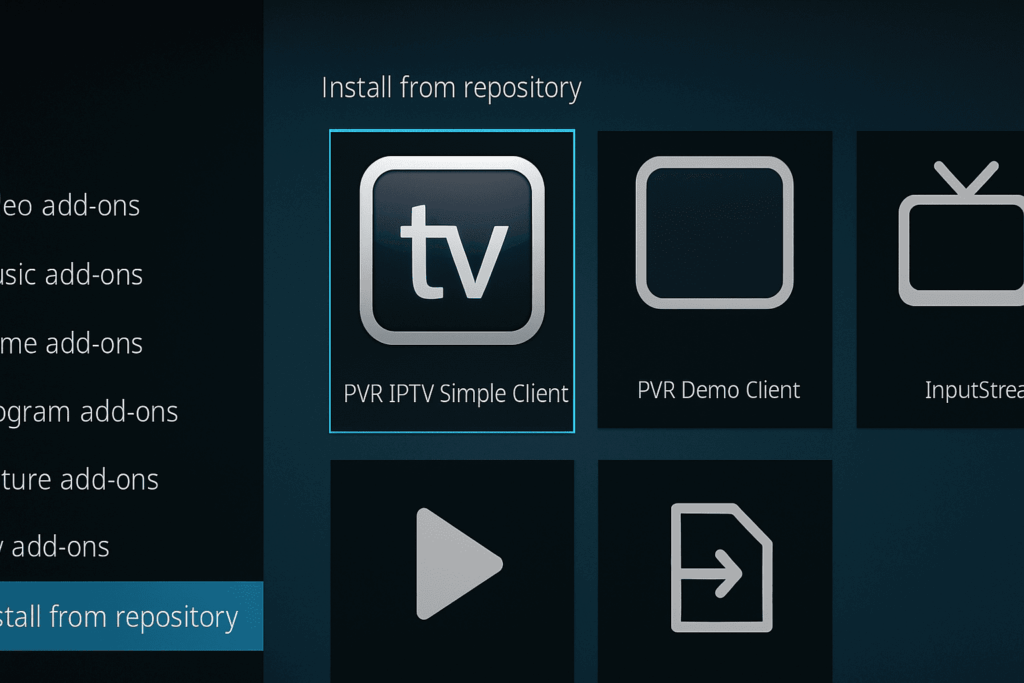
Click Install from repository.
Go to All repositories > PVR clients.
Find PVR IPTV Simple Client and click Install.
Wait for the “Add-on installed” notification.
Step 4: Configure Your IPTV Playlist
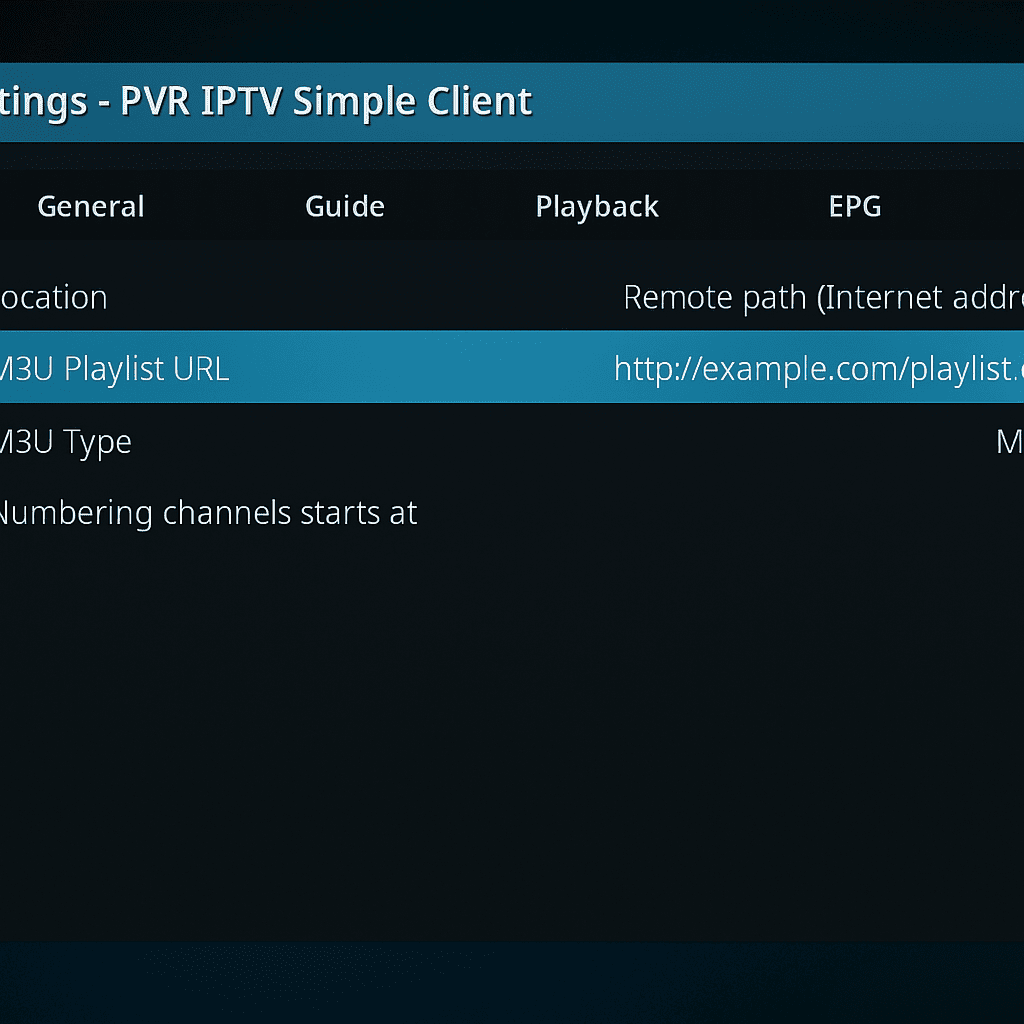
In the PVR IPTV Simple Client settings, go to General.
Under M3U Playlist URL, enter the playlist link provided by your IPTV provider (e.g., Flixivo).
If your provider offers an EPG URL (Electronic Program Guide), add it in the EPG Settings tab. This gives you TV schedules and channel information.
Step 5: Restart Kodi
Close and reopen Kodi so it can load your IPTV channels.
Go back to the TV section on the home screen — you should now see your live channel list.

Step 6: Enjoy Your Channels
You can now browse channels, check program schedules, and start watching live TV through Kodi IPTV.
For the best experience:
Use a stable internet connection (minimum 15 Mbps for HD).
Keep Kodi and your add-ons updated.
Pair with a quality IPTV provider like Flixivo for reliable HD/4K streams.
Pro Tip: If you use multiple devices, you can install Kodi everywhere and add the same IPTV playlist. This way, your viewing experience stays consistent across all screens.
Best IPTV Add-ons for Kodi in 2025
The real power of Kodi IPTV comes from its add-ons. These small extensions transform Kodi into a fully customized streaming hub. While there are hundreds of add-ons out there, not all are reliable or legal. Below are the best and most stable IPTV add-ons you can use in 2025, especially when paired with a trusted provider like Flixivo.
1. PVR IPTV Simple Client (Official Add-on)
Purpose: The go-to add-on for connecting Kodi to any M3U or Xtream IPTV playlist.
Why It’s Great: Comes pre-installed with Kodi’s repository, so you know it’s safe and reliable. It integrates your IPTV channels directly into Kodi’s TV interface, complete with EPG support.
Best For: Anyone who wants a clean, official setup without installing third-party repositories.
2. Playlist Loader
Purpose: Manage multiple M3U playlists inside Kodi.
Why It’s Great: If you have more than one IPTV subscription or want to switch between free and paid lists, Playlist Loader keeps everything organized.
Best For: Users who want variety and flexibility.
3. IPTV Merge
Purpose: Combines different IPTV playlists and EPG guides into one unified list.
Why It’s Great: Saves you from switching between lists. You can merge free channels with your Flixivo subscription for a seamless viewing experience.
Best For: Power users who want a single, well-organized channel list.
4. Catch-Up TV & More (Official Add-on)
Purpose: Access legal catch-up streams, replays, and live channels from multiple countries.
Why It’s Great: Fully legal content from verified sources, including TV replays and free-to-air channels.
Best For: Users who want on-demand content alongside live IPTV.
5. TV Guide Fullscreen
Purpose: Gives Kodi a full-screen TV guide similar to traditional cable interfaces.
Why It’s Great: Makes browsing channels easier, especially for large playlists. Works perfectly with Flixivo’s EPG data.
Best For: Viewers who prefer a familiar, grid-style guide layout.
Pro Tip for Add-ons
Always install add-ons from the official Kodi repository or trusted sources. This keeps your setup safe, stable, and free from malware. Pairing these add-ons with a stable IPTV provider like Flixivo ensures you get the best possible streaming quality without interruptions.
Troubleshooting Kodi IPTV Issues
While Kodi IPTV offers great flexibility, users sometimes face common problems like buffering, black screens, or channels not loading. Fortunately, most issues can be fixed quickly with the right approach. Here are some common problems and practical solutions:
1. Buffering and Lagging
Cause: Slow internet connection or network congestion.
Fix:
Use a wired Ethernet connection instead of Wi-Fi for more stable speeds.
Close other devices or apps consuming bandwidth.
Lower the video quality settings in your IPTV add-on if possible.
Restart your router regularly.
2. Black Screen or No Video
Cause: Outdated add-on, corrupted playlist, or unsupported video codecs.
Fix:
Update your IPTV add-ons via Kodi’s add-on manager.
Re-upload or refresh your M3U playlist URL.
Clear Kodi’s cache (via settings or a cache-cleaning add-on).
Check if the channel requires specific codecs or DRM support.
3. Channels Not Loading or Missing
Cause: IPTV provider issues or expired subscription.
Fix:
Verify your IPTV subscription status with your provider (e.g., Flixivo).
Confirm your playlist URL is correct and active.
Try switching to a different IPTV add-on temporarily.
4. Kodi Crashes or Freezes
Cause: Add-on conflicts or outdated Kodi version.
Fix:
Update Kodi to the latest stable release from the official site.
Disable or uninstall conflicting add-ons.
Perform a fresh Kodi install if problems persist.
5. Electronic Program Guide (EPG) Not Showing
Cause: Incorrect or missing EPG URL in your IPTV client settings.
Fix:
Ensure your IPTV provider supplies an EPG link and enter it correctly.
Use online EPG sources compatible with your playlist format.
Refresh or resync the EPG data regularly.
Extra Tip: Use a VPN for Smooth Kodi IPTV Streaming
VPNs can improve your Kodi IPTV experience by preventing ISP throttling, enhancing privacy, and bypassing geo-blocks. However, make sure your VPN has high speeds and a strict no-logs policy.
By following these troubleshooting tips, you can keep your Kodi IPTV setup running smoothly and enjoy uninterrupted streaming with Flixivo .
Kodi vs. Other IPTV Apps
When it comes to IPTV streaming, Kodi is just one of many options available. Let’s compare Kodi IPTV with some of the most popular IPTV apps: IPTV Smarters Pro, TiviMate, and Smart IPTV.
Kodi IPTV
Pros:
Open-source and completely free.
Highly customizable with thousands of add-ons.
Works on a wide range of devices.
Combines IPTV with local media playback.
Cons:
Steeper learning curve for beginners.
Setup can be more complex compared to dedicated IPTV apps.
Occasionally requires troubleshooting and maintenance.
IPTV Smarters Pro
Pros:
User-friendly interface tailored specifically for IPTV.
Supports multiple playlists and profiles.
Built-in parental controls and catch-up support.
Cons:
Limited customization compared to Kodi.
Requires sideloading on some devices (e.g., Firestick).
Some advanced features are behind paywalls.
TiviMate
Pros:
Clean, modern interface optimized for big screens.
Excellent EPG integration and channel management.
Supports multiple IPTV playlists.
Cons:
Android-only (no Windows or iOS support).
Paid subscription required for full features.
Less flexible outside IPTV use.
Smart IPTV
Pros:
Simple app focused purely on IPTV streaming.
Supports many formats and devices, including Smart TVs.
Cons:
No built-in media player functions outside IPTV.
Requires payment after a free trial.
Limited customization options.
Summary
Kodi IPTV is ideal if you want a free, versatile media center that can do IPTV plus much more, and you don’t mind spending time on setup and customization.
IPTV Smarters Pro and TiviMate are excellent for users who want easy-to-use, IPTV-focused apps with polished interfaces.
Smart IPTV works well for those seeking simplicity on Smart TVs without extra media features.
If you want to combine the best of both worlds — powerful customization with reliable IPTV streams — pairing Kodi IPTV with a premium service like Flixivo is a winning choice.

Flixivo + Kodi: The Perfect Combo
If you’re serious about getting the most out of your Kodi IPTV setup, pairing it with a premium IPTV provider like Flixivo is a game-changer. Here’s why Flixivo and Kodi are the perfect combination for seamless, high-quality streaming:
Reliable and High-Quality Streams
Flixivo offers stable, buffer-free streams in 4K quality, so you can enjoy your favorite channels without interruptions. Unlike many free IPTV lists, Flixivo’s servers are optimized to handle high traffic, ensuring smooth playback on Kodi.
Extensive Channel Selection
With Flixivo, you get access to thousands of live TV channels, movies, series, and sports from around the world — all accessible through Kodi’s user-friendly interface. Whether you want Dutch TV, international sports, or popular movie channels, Flixivo covers it all.
Easy Integration with Kodi
Flixivo provides M3U playlists and Xtream codes compatible with Kodi’s PVR IPTV Simple Client and other popular IPTV add-ons. This means you can quickly add your subscription details, start streaming, and enjoy EPG (program guide) support seamlessly.
Affordable Pricing with Free Trial
Flixivo offers competitive subscription plans tailored to your needs, including a free trial so you can test the service risk-free. Compared to expensive cable or satellite packages, Flixivo combined with Kodi IPTV gives you excellent value for money.
Customer Support and Updates
Flixivo’s dedicated support team helps you with setup, troubleshooting, and updates — so you’re never left in the dark. The service regularly updates channel lists and EPG data to keep your Kodi IPTV experience fresh and reliable.
Ready to Upgrade Your Kodi IPTV Experience?
Sign up for Flixivo today, integrate it with Kodi, and unlock a world of streaming possibilities — all at your fingertips.
Frequently Asked Questions About Kodi IPTV
Q1: Can I use Kodi IPTV for free?
Kodi itself is completely free and open-source, so you can use the software without paying anything. However, IPTV streams usually come from providers, many of which require a subscription. While some free IPTV lists exist, they are often unreliable or illegal. For a safe and stable experience, use a paid provider like Flixivo.
Q2: What devices support Kodi IPTV?
Kodi IPTV works on a wide range of devices, including Android TV boxes, Amazon Firestick, Windows and Mac computers, Linux, Raspberry Pi, and many Smart TVs. This makes it one of the most versatile IPTV players available.
Q3: Is Kodi IPTV safe to use?
Using Kodi IPTV is safe as long as you only install add-ons from official or trusted sources and avoid illegal IPTV streams. Always keep your Kodi software updated and consider using a VPN to protect your privacy while streaming.
Q4: Do I need a VPN for Kodi IPTV?
While not mandatory, using a VPN is highly recommended. It helps protect your online privacy, prevents ISP throttling that can cause buffering, and allows you to bypass geographic restrictions on some IPTV channels.
Q5: How do I update my IPTV playlist on Kodi?
You can update your IPTV playlist by going into the settings of your IPTV add-on (such as PVR IPTV Simple Client) and replacing the old M3U URL with the new one provided by your IPTV service. Restart Kodi afterwards to refresh the channel list.
Q6: Why are some Kodi IPTV channels not working?
Channels may stop working due to IPTV provider issues, expired subscriptions, outdated playlists, or network problems. Always verify your subscription status and ensure you have the latest playlist URLs from your provider.
Conclusion
Kodi IPTV offers an incredibly flexible and powerful way to stream live TV, movies, and sports across multiple devices — all from one easy-to-use platform. By combining Kodi’s open-source media center with a reliable IPTV provider like Flixivo, you get access to thousands of channels in HD and 4K quality, stable streams, and a fully customizable viewing experience.
Whether you’re a tech-savvy user who loves tweaking settings or a casual streamer looking for an affordable alternative to cable, Kodi IPTV gives you the best of both worlds. Just remember to use official add-ons and trusted IPTV subscriptions to stay legal and avoid common streaming issues.
Ready to elevate your streaming experience? Try Flixivo today and integrate it effortlessly with Kodi — your ultimate IPTV solution for 2025 and beyond.
Get Started with Flixivo and Kodi IPTV Today!
Ready to unlock the full potential of Kodi IPTV? Flixivo offers a reliable, high-quality IPTV service that integrates seamlessly with Kodi, giving you access to thousands of live channels, movies, sports, and more — all in FHD and 4K quality.
Stable streams with minimal buffering
Extensive channel lineup from around the world
Easy setup with Kodi’s popular IPTV add-ons
Affordable subscription plans with a free trial
Don’t wait! Experience the best Kodi IPTV setup by signing up for Flixivo now:
👉 Start Your Free Trial with Flixivo
Enjoy uninterrupted streaming on all your devices — from Android TV boxes and Firesticks to Windows PCs and Smart TVs.
 French
  English
  Dutch
Dutch  German
  Spanish